
Dashboard
你会得到什么
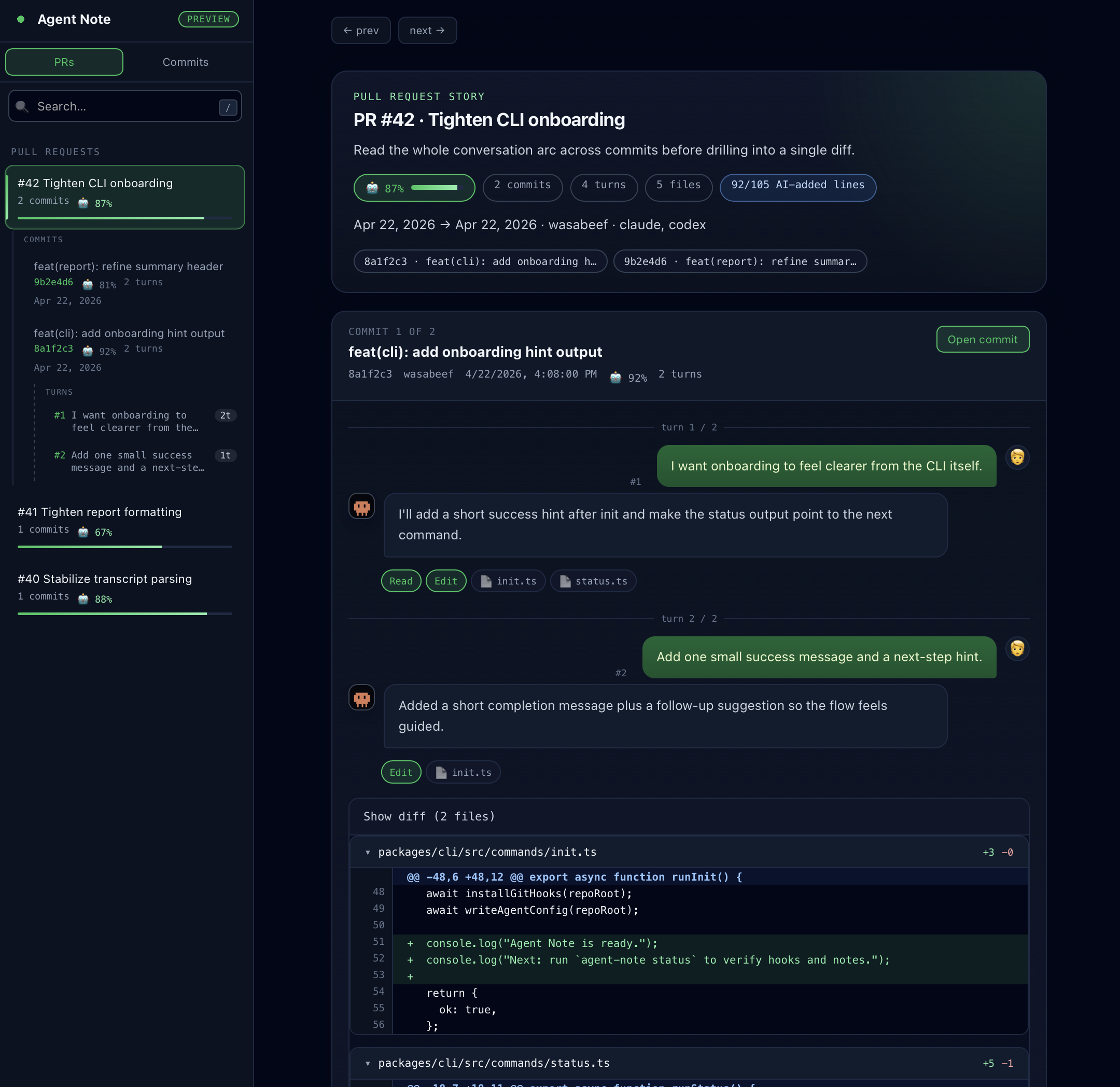
Section titled “你会得到什么”Dashboard 会给团队一个共享 URL,用来查看 Agent Note 的历史记录。
- 在一个地方查看 open 和 merged 的 PR 历史
- 不用逐个打开 PR,也能查看 commit、prompt 和 attribution
- 当 Agent Note 能恢复 reference 或 scope 时,在短 prompt 前显示仅用于展示的
📝 Context - 一个共享的 GitHub Pages URL,通常位于
/dashboard/
当 PR 报告已经不够用,而团队需要一个统一的查看页面时,就适合使用 Dashboard。
只有在你需要共享的网页视图时,才需要 Dashboard。
- 如果 pull request 里的 AI 会话报告已经足够,就停在 GitHub Action。
- 如果你想要一个共享的 Pages 视图来查看 open 和 merged 历史,就继续看这里。
- 先执行一次 Dashboard setup。
npx agent-note init --agent claude --dashboard- 提交这两个 workflow 文件。
git add .github/workflows/agentnote-pr-report.yml .github/workflows/agentnote-dashboard.ymlgit commit -m "chore: enable agent-note dashboard"git push- 在 GitHub Pages 中,把 source 设为 GitHub Actions。
生成的 Dashboard workflow 会用 wasabeef/AgentNote@v1 并传入 dashboard: true,执行恢复、同步、build、artifact 上传和 note 持久化,然后把共享视图发布到 /dashboard/。如果同一个 job 已经上传 GitHub Pages artifact,Agent Note 会把 Dashboard 添加到该 artifact 的 dashboard/ 目录,而不是替换现有网站。如果另一个 job 或 workflow 已经发布 Pages,Agent Note 会跳过 standalone 发布;要合并 docs site 和 Dashboard,请把 Agent Note 放在同一个 job 中,并放在 actions/upload-pages-artifact 之前。
公共 URL
Section titled “公共 URL”通常 Dashboard 会发布在这里:
https://<owner>.github.io/<repo>/dashboard/
例如:
https://wasabeef.github.io/AgentNote/dashboard/
即使是全新的仓库,也可以在 Dashboard 第一次发布之前先积累 Dashboard 数据。如果允许 Pull Request Deploy,公开的 Pages URL 可以在第一次成功的 pull_request run 之后出现。否则,它会在 default branch 的第一次成功 deploy 之后出现。
refs/notes/agentnote仍然是 Source of Truth- Dashboard Mode 的
wasabeef/AgentNote@v1会把 note 快照写入gh-pages/dashboard/notes/*.json - GitHub Pages 会在
/dashboard/提供构建后的 Dashboard
仓库本身不会提交示例 Dashboard JSON。新的 Dashboard 会一直保持为空,直到 workflow 恢复或生成 note file。pull_request 会发布 Open 状态,推送到 default branch 后则会替换为 Merged 状态。
没有数据显示时
Section titled “没有数据显示时”Dashboard 现在会显示可能原因,而不是只提示缺少数据。
- 完全没有数据:确认启用 Agent Note 后是否跑过 PR workflow、Dashboard workflow 是否成功、
refs/notes/agentnote是否已经 push。 ?pr=<number>没有数据:该 PR 的 workflow 可能还没运行,GitHub Pages environment protection 可能阻止了 Pull Request Deploy,或者 URL 里的 PR 编号不属于已发布的 Dashboard data。?commit=<sha>没有数据:该 Commit 可能没有 Agent Note entry,notes 可能还没 push,或者这个 SHA 来自另一个仓库。
如果页面能打开但仍然为空,请查看 Troubleshooting。