
Layer 1: Local Temp
Session data in .git/agentnote/sessions/. JSONL files for prompts, changes, and blob hashes. Rotated after each commit. Never pushed.
This page explains the mechanics behind the report: what is captured locally, what becomes a git note, and how that data reaches PR Report and Dashboard. You do not need every detail to use Agent Note, but this is the place to check the model when something looks surprising.
Hooks capture the prompt and turn id.
Hooks or transcripts record the changed files and the clues used for attribution.
When recordable session data exists, git commit injects the trailer and writes the git note.
git push sends refs/notes/agentnote to the remote.
With the generated git hooks installed, most repos can keep using plain git commit and git push. Cursor can also recover prompt / response pairs from local transcripts, and its shell hooks can keep tracking commits when git hooks are unavailable.
Layer 1: Local Temp
Session data in .git/agentnote/sessions/. JSONL files for prompts, changes, and blob hashes. Rotated after each commit. Never pushed.
Layer 2: Git Notes
Permanent record in refs/notes/agentnote. One JSON per commit. Pushable, fetchable, shareable with the team.
| File | Purpose |
|---|---|
prompts.jsonl | One prompt per line with turn number |
changes.jsonl | Files touched by AI with post-edit blob hashes |
pre_blobs.jsonl | File state before each AI edit |
heartbeat | Session activity timestamp |
turn | Monotonic counter incremented on each prompt |
{ "v": 1, "agent": "claude", "session_id": "a1b2c3d4-...", "timestamp": "2026-04-02T10:30:00Z", "model": "claude-sonnet-4-20250514", "interactions": [ { "prompt": "Implement JWT auth middleware", "contexts": [ { "kind": "reference", "source": "previous_response", "text": "The previous response explains why this middleware needs to change." } ], "selection": { "schema": 1, "source": "primary", "signals": ["primary_edit_turn"] }, "response": "I'll create the middleware...", "files_touched": ["src/auth.ts"], "tools": ["Edit"] } ], "files": [ { "path": "src/auth.ts", "by_ai": true }, { "path": "CHANGELOG.md", "by_ai": false } ], "attribution": { "ai_ratio": 73, "method": "line", "lines": { "ai_added": 146, "total_added": 200, "deleted": 12 } }}
Usually line-level. Agent Note compares the file before and after each AI edit, then removes later human edits from the final diff.
Starts as file-level. It upgrades to line-level only when the transcript patch count matches the final commit diff.
Starts as file-level. It upgrades to line-level only when edit counts match and the final file still matches the last AI edit.
Records prompt / response and file-level attribution from hooks and transcripts. Line-level attribution is not available yet.
📝 Context Is Collected📝 Context is a display-only note for short prompts such as “continue” or “do the next one”. It helps readers understand the prompt without changing attribution.
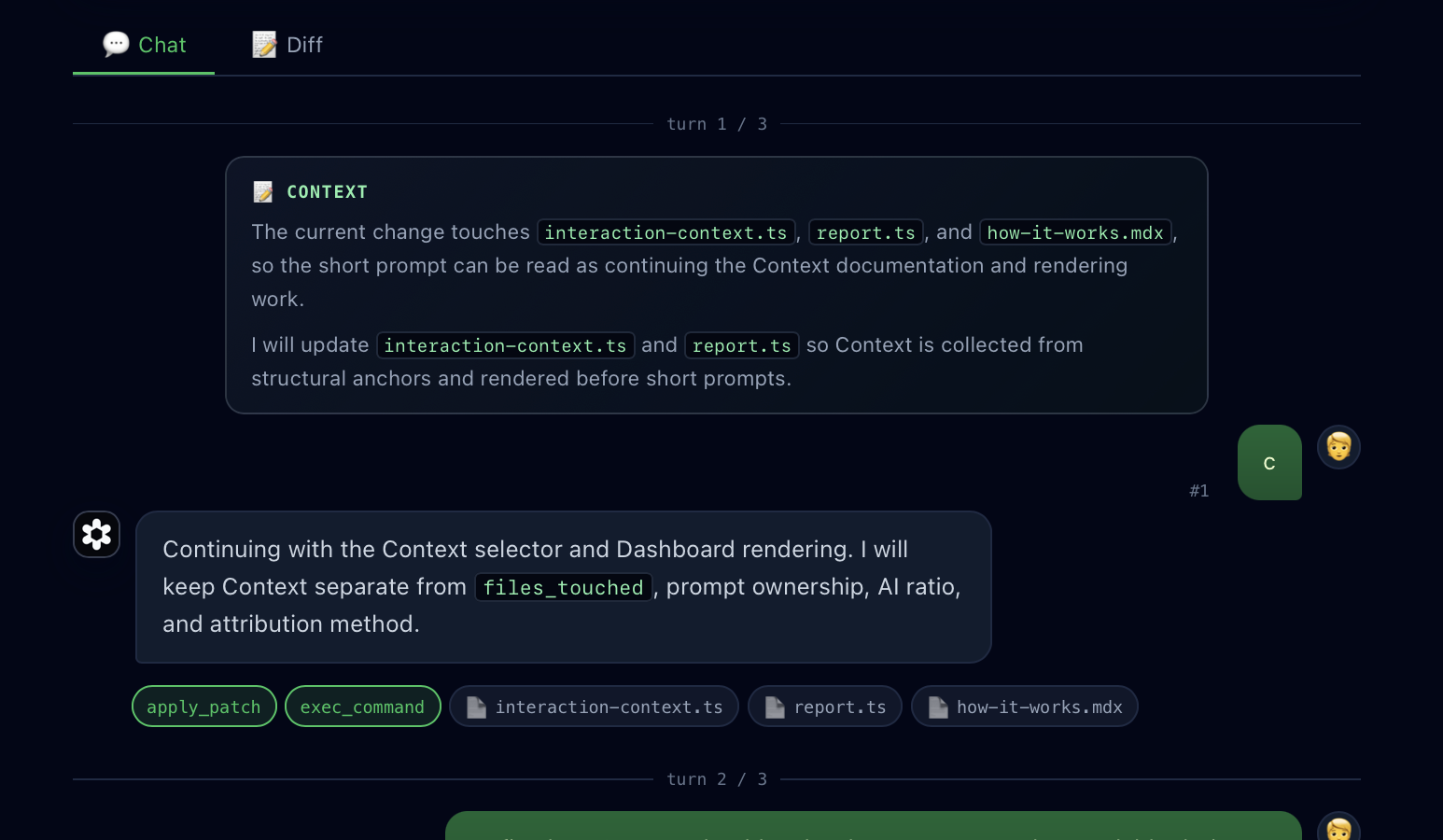
reference context comes from the immediately previous response when it mentions a changed file path, file name, or code identifier from the final diff.scope context comes from the current response when its opening lines clearly name the work being done.yes, continue, or お願いします as selection rules. If there is no concrete file or code clue, it skips Context.files_touched, prompt ownership, AI Ratio, attribution method, or whether a git note is saved.Agent Note and Entire solve related but different problems.
refs/notes/agentnote; temporary session files stay under .git/agentnote/. Entire centers checkpoint metadata and a hosted web application.| Event | What happens |
|---|---|
| SessionStart | Creates session directory, writes heartbeat |
| UserPromptSubmit | Appends prompt, increments turn counter, rotates logs |
| PreToolUse Edit/Write | Captures pre-edit blob hash (synchronous) |
| PostToolUse Edit/Write | Captures post-edit blob hash + file path |
| Stop | Logs stop event (heartbeat stays active — Stop = response end, not session end) |
Git notes are invisible to branch listings, GitHub UI, and CI — but pushable and fetchable.
# Share with teamgit push origin refs/notes/agentnote
# Fetch from remotegit fetch origin refs/notes/agentnote:refs/notes/agentnote
# View a notegit notes --ref=agentnote show <commit>For storage boundaries, visibility, and what is never uploaded to an Agent Note service, see Data & Privacy.


