
레이어 1: 로컬 임시 데이터
.git/agentnote/sessions/ 안의 세션 데이터. prompt, 변경 내역, blob hash 를 담는 JSONL 파일입니다. 각 commit 뒤에 rotate 되며 push 되지 않습니다.
이 페이지는 report 뒤의 동작을 설명합니다. 무엇을 local 에서 수집하고, 무엇을 git note 로 남기며, 그 data 가 PR Report 와 Dashboard 에 어떻게 도착하는지 확인할 수 있습니다. Agent Note 를 쓰는 데 모든 세부사항을 외울 필요는 없지만, 결과가 예상과 다를 때 돌아올 model 입니다.
hooks 가 prompt 와 turn id 를 기록합니다.
hooks 또는 transcripts 가 변경된 file 과 attribution 에 쓰는 단서를 남깁니다.
기록 가능한 session data 가 있을 때 git commit 이 trailer 를 넣고 git note 를 씁니다.
git push 로 refs/notes/agentnote 를 remote 로 보냅니다.
생성된 git hook 이 설치되어 있으면 대부분의 리포지토리에서는 평소처럼 git commit 과 git push 를 쓰면 됩니다. Cursor 는 local transcript 에서 prompt / response 쌍을 복원할 수 있고, git hook 을 쓸 수 없어도 shell hook 으로 commit 추적을 이어갈 수 있습니다.
레이어 1: 로컬 임시 데이터
.git/agentnote/sessions/ 안의 세션 데이터. prompt, 변경 내역, blob hash 를 담는 JSONL 파일입니다. 각 commit 뒤에 rotate 되며 push 되지 않습니다.
레이어 2: Git Notes
refs/notes/agentnote 안의 영구 기록. commit 당 하나의 JSON. push, fetch, 팀 공유가 가능합니다.
| 파일 | 목적 |
|---|---|
prompts.jsonl | turn 번호와 함께 한 줄에 하나의 prompt |
changes.jsonl | AI 가 수정한 파일과 post-edit blob hash |
pre_blobs.jsonl | 각 AI edit 이전의 file 상태 |
heartbeat | 세션 활동 시각 |
turn | prompt 마다 증가하는 단조 증가 카운터 |
{ "v": 1, "agent": "claude", "session_id": "a1b2c3d4-...", "timestamp": "2026-04-02T10:30:00Z", "model": "claude-sonnet-4-20250514", "interactions": [ { "prompt": "JWT auth middleware 구현", "contexts": [ { "kind": "reference", "source": "previous_response", "text": "이전 response 가 이 middleware 를 바꿔야 하는 이유를 설명합니다." } ], "selection": { "schema": 1, "source": "primary", "signals": ["primary_edit_turn"] }, "response": "middleware 를 만들겠습니다...", "files_touched": ["src/auth.ts"], "tools": ["Edit"] } ], "files": [ { "path": "src/auth.ts", "by_ai": true }, { "path": "CHANGELOG.md", "by_ai": false } ], "attribution": { "ai_ratio": 73, "method": "line", "lines": { "ai_added": 146, "total_added": 200, "deleted": 12 } }}
보통은 line-level 입니다. Agent Note 는 각 AI edit 전후의 file 상태를 비교하고, 나중에 들어간 human edit 를 final diff 에서 다시 빼서 계산합니다.
처음에는 file-level 입니다. transcript patch count 가 final commit diff 와 맞을 때만 line-level 로 올라갑니다.
처음에는 file-level 입니다. edit count 가 맞고 final file 이 마지막 AI edit 와 그대로 같을 때만 line-level 로 올라갑니다.
hook 과 transcript parsing 으로 prompt / response 와 file-level attribution 을 기록합니다. line-level 은 아직 없습니다.
📝 Context 를 수집하는 방식📝 Context 는 continue 나 다음 작업으로 넘어가 같은 짧은 prompt 를 읽기 쉽게 만드는 표시 전용 보충 설명입니다. attribution 에는 영향을 주지 않습니다.
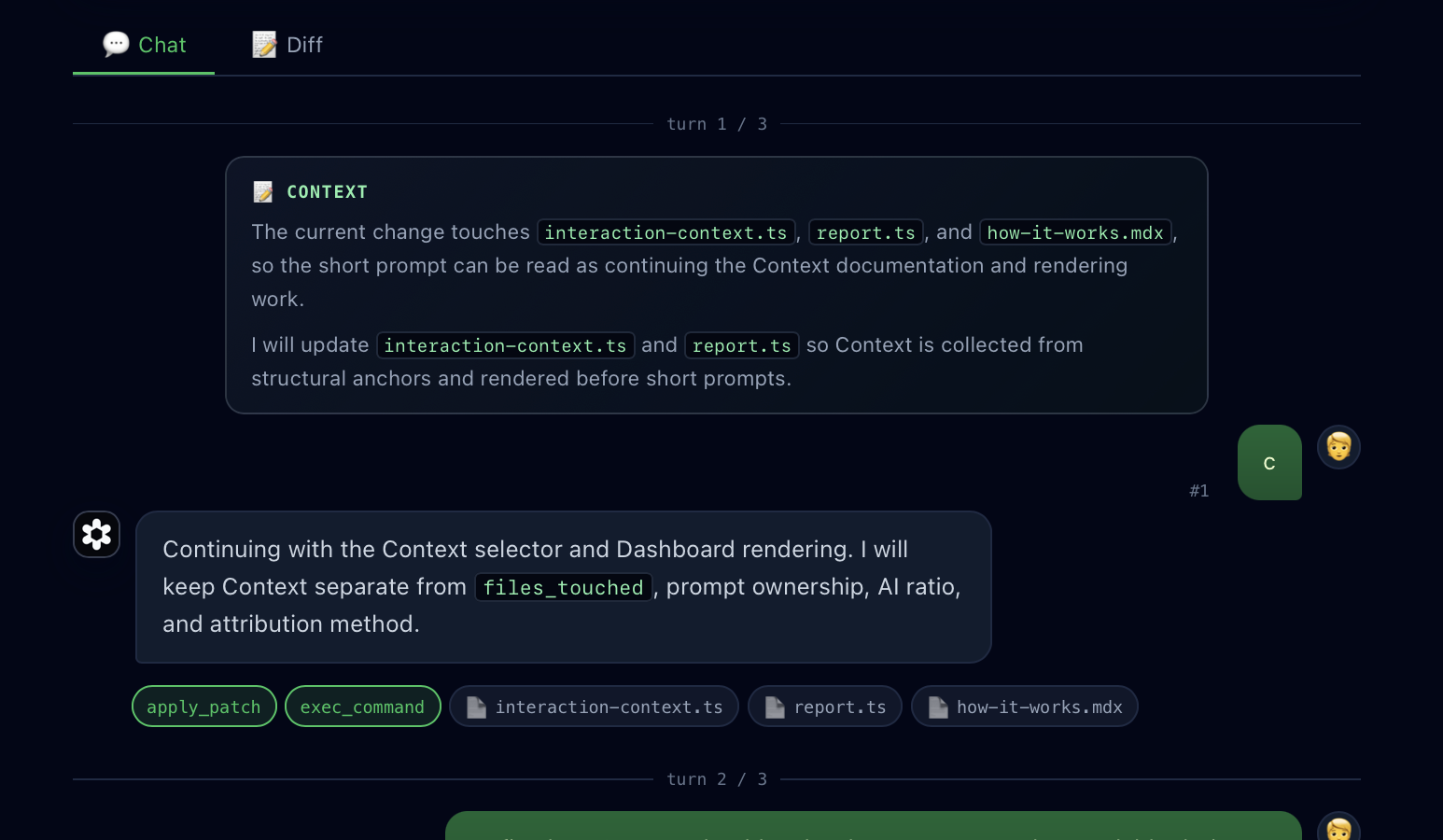
reference context 는 바로 이전 response 에서 가져옵니다. final diff 에 포함된 file path, file 이름, code identifier 가 언급될 때만 사용합니다.scope context 는 현재 response 에서 가져옵니다. response 초반이 이번 작업 범위를 구체적으로 설명할 때만 사용합니다.yes, continue, お願いします 같은 짧은 승인 표현만으로 Context 를 선택하지 않습니다. file 이나 code 에 대한 구체적인 단서가 없으면 Context 를 붙이지 않습니다.files_touched, prompt ownership, AI Ratio, attribution method, git note 저장 여부를 절대 바꾸지 않습니다.Agent Note 와 Entire 는 비슷한 문제를 다루지만 목표 workflow 가 다릅니다.
refs/notes/agentnote 에 저장되고, 임시 session file 은 .git/agentnote/ 아래에 남습니다. Entire 는 checkpoint metadata 와 hosted web application 을 중심으로 합니다.| 이벤트 | 발생하는 일 |
|---|---|
| SessionStart | 세션 디렉터리를 만들고 heartbeat 를 기록 |
| UserPromptSubmit | prompt 를 추가하고, turn counter 를 증가시키며, log 를 rotate |
| PreToolUse Edit/Write | pre-edit blob hash 를 동기적으로 캡처 |
| PostToolUse Edit/Write | post-edit blob hash 와 file path 를 캡처 |
| Stop | stop event 를 기록함 (heartbeat 는 계속 활성 상태 — Stop = response 끝, session 끝 아님) |
Git notes 는 branch 목록, GitHub UI, CI 에서는 보이지 않지만 push / fetch 는 가능합니다.
# 팀과 공유git push origin refs/notes/agentnote
# remote 에서 가져오기git fetch origin refs/notes/agentnote:refs/notes/agentnote
# note 보기git notes --ref=agentnote show <commit>


